What is it?
Hellas Gate is a developer-first LLM model router with three unique features:
- Smart Routing: dynamically choose models and providers
- Virtual Models: easily integrate into your editors and tools
- Local Compute: access local compute from anywhere; think "tailscale for your local LLM"
Read on for more details, or see the Quickstart to get started.
Smart Routing
Gate's smart routing lets you dynamically choose which models and providers to use based on a number of preferences:
- Cost
- Latency
- Geographical location
- Model (e.g. Llama)
- Provider (e.g., OpenAI, Anthropic, etc.)
- ... and more.
You can also route by intent. For example, you can ask for the best model for writing code.
Virtual Models
Virtual models are like aliases for a router.
For example, you could create an autocomplete model which picks the lowest-latency model on any provider.
Then you can configure your editor to use this model for autocompletion.
Local Compute
If you run an OpenAI-compatible API locally (like vLLM), you can make it available to your own account anywhere in the world. Think of this as "tailscale for your local LLM".
See local compute for setup instructions.
Quickstart
Time estimate: ~1-3 minutes.
- Navigate to https://gate.hellas.ai/ and log in
- Click "API"
- Click "New API Key" and enter a name to create a new API key.
- Leave all configuration as default
- Record the key somewhere secure. It will look something like
hx-u-d9dea0e1-6717-4947-82a6-86ae8d71d995
You can now test your key.
Set the $HELLAS_API_KEY environment variable:
$ export HELLAS_API_KEY="hx-u-.."
Then, use curl and jq to get a list of models:
    $ curl --request GET \
      --url https://api.hellas.ai/v1/models \
      --header "Authorization: Bearer $HELLAS_API_KEY" | jq '.data[].id'
You should see a list of models like this:
    "meta-llama/llama-4-maverick-17b-128e-instruct"
    "gpt-4o-audio-preview"
    "gemini-1.5-flash-8b-latest"
    "gemini-1.5-pro-latest"
    ... etc
To configure your editor to use Hellas Gate, see editors.
Local Compute
Hellas Gate's local compute feature is still under development; check in on our discord to find out more.
Roadmap
TODO
Editors
Using editors with Hellas
Cline
Cline, an AI assistant that can use your CLI aNd Editor.
Install
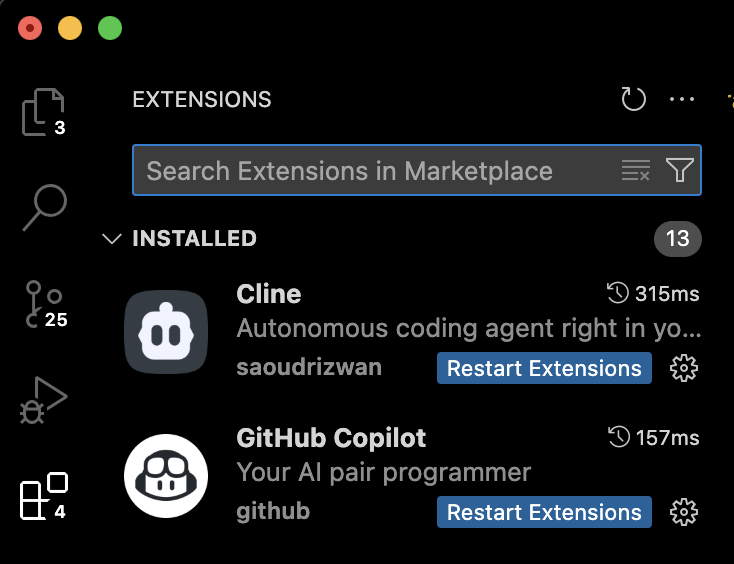
First, we need to install the Cline VSCode extension- search it in the extensions tab.
Open
To open the Cline tab, open VSCode command pallette with Cmd+Shift+P and search cline.
Select the 'Cline: Open in new Tab' option.

Configure
At the bottom of the Cline tab, click the name of the model at the bottom of the tab.

-
In the "API Provider" dropdown, select "OpenAI Compatible"
-
In the "Base URL" field, set
https://api.hellas.ai/v1 -
Create a new API key on
https://gate.hellas.ai/keys, copy it, and paste into the "API Key" field. -
Find the model you want to use on
https://gate.hellas.ai/models, and copy the model ID into "Model ID" config. -
(Optional) Adjust the advanced settings (max context length, max output tokens) to match the values from the model card.
Cursor
How to use Hellas with Cursor (with images!)
Hellas and Avante.nvim
Wow!